***************************************************
*                                                 *
* THIS IS DANGEROUS AND MIGHT DAMAGE YOUR CAMERA. *
*   IF IT BREAKS, YOU GET TO KEEP BOTH PIECES.    *
*                                                 *
***************************************************
If you are not comfortable with this, stop reading and delete the software before you are tempted to try running it on your camera.
English | Česky | Deutsch | Hungarian | Dutch | Español | Français | Italiano | Română | Русский | Türkçe | 简体中文 | 日本語
WARNING
THIS GUIDE IS OUTDATED AND KEEPT HERE FOR REFERENCE.
TO FIND LAST UPDATES AND DOCUMENTATIONS GO TO:
Important notes
- EyeFi cards may not work [1]; you must use SD / SDHC / SDXC / CF cards.
- If you have a bootable card and have the BOOTDISK flag set in the camera (which the installer does), and you do not have an AUTOEXEC.BIN file on the card, the camera WILL NOT BOOT! It will hang and not wake up until the battery is removed.
- If you encounter a "locked up" camera, quickly remove the battery.
- When in doubt, remove the battery and reboot.
- And, remember that this software can damage or destroy your camera.
Introduction
There are 2 ways of running user code on Canon dSLR cameras:
- using the update process with a .fir file, which must be digitally signed.
- using the Autoboot process: the autoexec.bin file is loaded and executed. This file does not have to be signed, but the bootdisk flag must be enabled in the camera and boot strings must be present on the card.
With great power comes great responsibility!
Before installing Magic Lantern, you need to:
- Know how to use a computer (how to download a file, how to unzip an archive, how to open a PDF document...)
- Know your camera. Please don't ask us how to change ISO in video mode or what is Highlight Tone Priority. Magic Lantern is a tool for power users, not a cool toy for beginners. We recommend you to use your camera for a few months (or more!) before even thinking of installing third-party firmware.
- Do your research. Read the user guide and the FAQ, explore the wiki and the forums.
- Be patient. Magic Lantern is actually very easy to use once you know the basics.
First-time installation
Step 1. Preparing your camera
- Fully charge your battery
- Remove any accessories from your camera (such as battery grip or external flash)
- For first install, use a simple SD/SDHC/CF card (32 GB or smaller). 64GB cards and larger will not work for first install (but you can use them with ML, see below).
- Make sure you have a card reader.
- Upgrade your Canon firmware:
- for Canon 500D / T1i / Kiss X3: firmware 1.1.1 (Windows, Mac)
- for Canon 550D / T2i / Kiss X4: firmware 1.0.9 (Windows, Mac)
- for Canon 600D / T3i / Kiss X5: firmware 1.0.1 (mirror link on Vimeo, mirror link on Bitbucket)
- for Canon 50D: firmware 1.0.9 (Canon pages)
- for Canon 60D: firmware 1.1.0 (Windows, Mac)
- for Canon 5D Mark II: firmware 2.1.1 (mirror link on Bitbucket)
- Rotate your mode dial to Manual (M) position
- Restore your camera to default settings (Clear all camera settings, from Wrench 3 menu)
Step 2. Installation
- Format the card from the camera (low-level format).
- Unzip all the files from Magic Lantern zip archive to the root of your card.
- Launch the Firmware Update process.
- If the card LED is blinking for more than a few seconds, upgrade your Canon firmware from these links (even if you already have the correct firmware version number!) and try again.
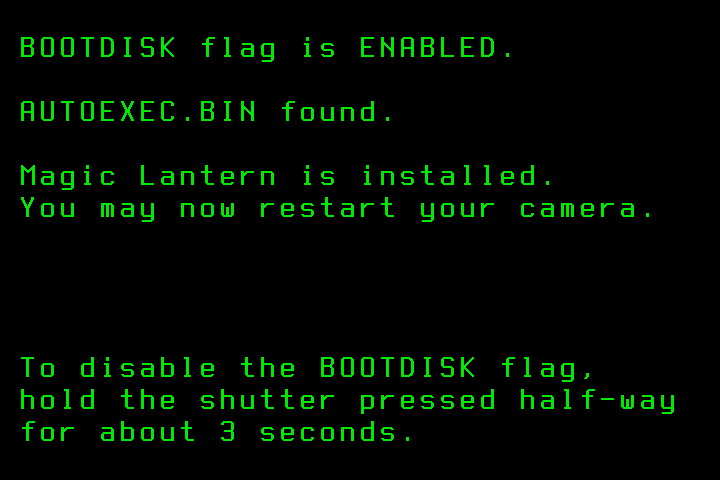
- Once you see the green confirmation screen, restart your camera. Done.
- If something goes wrong, check the #Troubleshooting section.
FYI (you don't hve to do this):
- The installer (ml-*.fir) will perform two actions:
- enables the BOOTDISK flag in NVRAM by calling the EnableBootDisk() function from Canon firmware. This change is persistent, but it can be reverted easily.
- makes the card bootable, by writing the BOOTDISK and EOS_DEVELOP strings on the SD card according to Bootdisk page.
Installing Magic Lantern on other cards
- If you use SD/SDHC/CF cards, you may simply repeat Step 2 on every card you would like to use Magic Lantern.
- If you use 64 GB cards or higher, or if you prefer to skip the firmware update step and prepare all your cards from the PC, you may copy ML files on your card and make it bootable with a special utility: EOScard for Windows, MacBoot for Mac, or make_bootable.sh for Mac/Linux in command line.
Updating Magic Lantern
- Bookmark this page (Unified#Downloads) and check for updates periodically.
- To install an updated version, just unzip (or copy) all new Magic Lantern files on your card and overwrite the old ones.
Uninstalling Magic Lantern
Don't just delete the Magic Lantern files from the card! If you do, the camera will freeze at startup and you'll have to take the battery out.
Uninstalling ML from one card
- Format that card from the camera (select this option: Format card, remove Magic Lantern) and reboot. Your camera will load the original firmware when you use that card.
Uninstalling ML from the camera
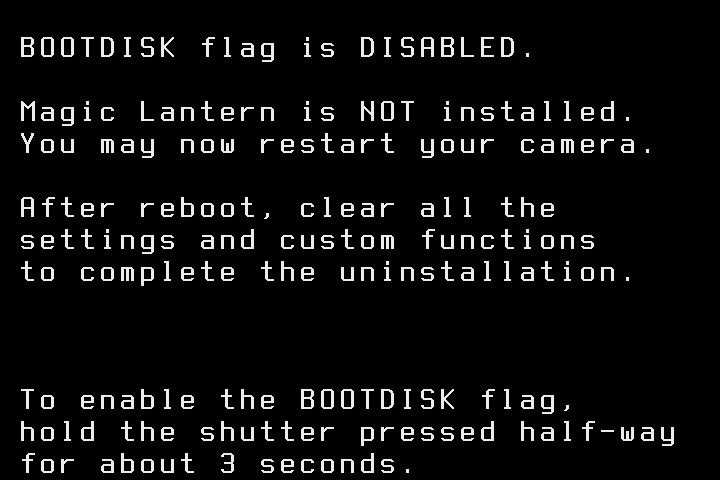
- With a Magic Lantern card, launch the Firmware Update process and follow the instructions on-screen.
Troubleshooting
- If the card LED blinks continuously after running Firmware Upgrade, you don't have the right Canon firmware version or sub-version. To fix it, install the official Canon firmware upgrade from these links, even if you already have the correct version number (you may have a different sub-version number).
- If the screen does not turn on, but autofocus works, remove the battery and format the card. This happens when the card is bootable, but autoexec.bin is not there.
- Check if all doors are closed. The camera will not boot if any of the card or battery doors are open !
- If the camera does not boot (seems dead), remove the battery and the card. Then put the battery back and try to boot the camera without card. Then put a formatted card in the camera and try to boot without Magic Lantern. Only after you are sure the camera is OK, you can try to see what's wrong with Magic Lantern.
- If the camera asks for a firmware update, place Canon firmware on the card (this was a problem in older versions).
- DO NOT use a bootable card without a working autoexec.bin on it! If you do, remove the battery immediately, switching the camera off is not enough !!!
- Check the issue tracker for similar problems; if you can't find the solution, create a new issue there.